Crashes, No Sound, or Screen Glitches?
Random freezes, missing sound and display glitches usually trace back to one bad driver. Find and replace yours safely.Free scan · under a minuteWindows Errors? Fix Them Before They Spread
Repair common Windows errors and clear accumulated junk for a smoother, more stable PC - no reinstall needed.Free scan · no reinstallThe Geeks Club is reader-supported. When you buy through links on our site, we may earn an affiliate commission. As an Amazon Associate I earn from qualifying purchases. Learn more
Chinese tech giant Vivo recently launched their new smartphone in the Indian market. The all-new Vivo V11 Pro is here in the market with some pretty good upgrades from its predecessor Vivo V9 series. The smartphones combine with several incredibly innovative features and useful techniques. This guide talks about the list of Best Vivo V11 Pro hidden Tips and Tricks you should know.
Best Vivo V11 Pro hidden Tips and Tricks
Just after the launch, many of the Indian consumers bought this beautiful device because of its unique features and expansive display. The smartphone is now trending in the market with its high demand. However, there are so many secret features for you to check out. Let’s go..!
Change color Temperature
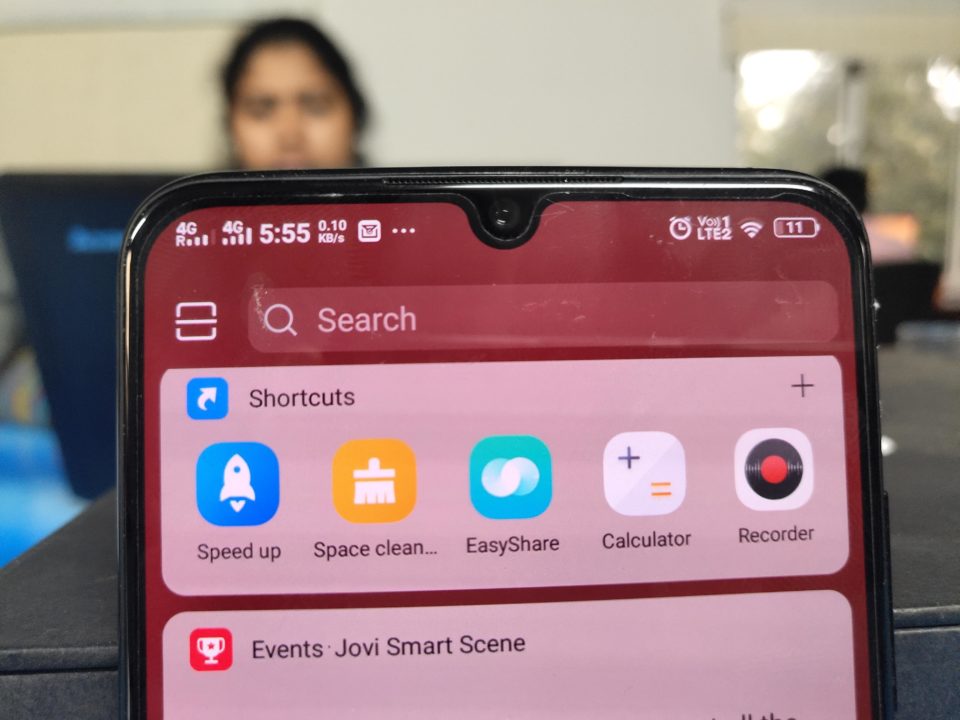
Vivo V11 Pro comes with an option to adjust your display temperature. You can effectively manage the color temperature of your smartphone with the built-in settings. Also, the device has an AMOLED panel. Therefore, as default, the colors of the screen are a little bit washed to comfort the eyes and one can easily read things.
Do these 3 things before closing this tab:
1Fix the driver behind crashes, sound loss and screen glitches2Repair Windows errors before they cause bigger problems3Scan for outdated or missing drivers - takes under a minute
But this feature can be irritating for some users. You can change the color mode by going into the Setting –> Display and Brightness –> Color Temperature Adjustment –> Turn ON.
Shopping ad

- Please check your phone model before buying.
- All items are inspected and are in good condition before shipment.
- Replace old, broken, cracked or damaged items.
- If you have any questions about quality assurance and friendly after-sales service, please contact us in time.
- Daguys for vivo V11 / V11 Pro OLED Material LCD Screen and Digitizer Full Assembly (Black)
Always On Display Customization
Since the device comes with an AMOLED panel, it supports the popular always on display feature. The company is even providing the options to customize the always on display.

You can customize the style and appearance of the always on display in the Vivo V11 Pro by going to Lock Screen –> Home Screen –> Wallpaper –> Always-on Display –> Customize.
Shopping ad
- Compatible with Vivo V11 (V11 Pro) 1804
- 【Shockproof】Anti-seismic Anti-drop Protection extends to inside of the caseand outer bumperboth of which provideshoch-absorption.
- 【Easy To Carry】Slim and compact, easy to put in your,pocket, portable and beautiful.
- 【Precise Cut】Precise cut for easy access to all ports, buttons,sensors and cameras.The buttons are accurate, responsive and easy to press.
- 【Colourful】Rich and varied colours bring beautiful visual effects.
Jovi Assistant
All new Vivo phones now come with their specially created Jovi digital assistant. To use this, just swipe left from the home screen. Then it will show the Jovi feed page. Here you can add your shortcuts of the apps you use most often, check weather updates and more.

You can turn off the unwanted cards by scrolling down in the feed page and tapping on the Card Management. Here you can individually manage the cards for your choice.
Shopping ad

- Compatible with Vivo V11
- 【PU Leather】Made of flexible and durable material, can protect your cell phone from damage
- 【Kickstand】The cell phone case with flip stand function makes it easy to read and watch movies
- 【Wallet Cover】Built-in card holder for your cards and change, equivalent to your small wallet
- 【Precision cut】This is a leather case for your phone with precision cut holes for easy access to all ports, buttons, sensors and cameras
Camera effects and other useful mods
As you all know, Vivo always focuses on camera and music department of the smartphone. The all-new camera app for the Vivo smartphones is very popular because of its useful features. The app comes with several advanced level camera mods for your perfect portraits.

To enable the newly introduced lighting effects, just tap on the portrait button and swipe to sides. Then it will show up different lighting mods including monochrome background, studio lighting, stereo lighting etc.
Shopping ad
- 【Complete Protection Bundle】Includes 1 soft TPU phone case and 2 high-quality tempered glass screen protectors for 360° protection against drops, scratches, and daily wear.
- 【Durable TPU Shockproof Case】Flexible yet tough TPU material cushions impacts while keeping your phone slim, lightweight, and comfortable to hold.
- 【9H Tempered Glass Screen Protectors】Each protector offers ultra-clear visibility, 9H hardness for scratch resistance, and smooth touch sensitivity.
- 【Perfect Fit & Full Functionality】Specifically designed with precise cutouts and responsive button covers — no need to remove the case for access.
- 【Easy Installation & Case Compatibility】Bubble-free installation for both screen protectors; case-friendly design ensures compatibility with the included TPU case.
Face beauty for video calls
This is a very good feature for those who want to impress others while video calling. While all new smartphone models come with beauty mods in their camera app, only a few models come with abilities to use the beautification mode for video calls as well.

In Vivo V11 Pro, you can turn on the face beauty for different apps which supports video calling. To do this, navigate to Settings –> More settings –> Face beauty for video calls.
Shopping ad
![Lucyliy (3 Pack) Compatible with Vivo V11 Pro Screen Protector Tempered Glass,Case Friendly [Hardness 9H ][High definition] [Anti Scratch]](https://m.media-amazon.com/images/I/41zouFG5qVL._SL160_.jpg)
- Ultra-durable tempered glass boasts a hardness of 9H+, effectively protects the screen from scratches and bumps, is difficult to shatter and can save the screen in the event of accidental drops [Assured Protection]
- Easy to install, problem free, bubble free, easy to install, suitable for your device screen. Easy to apply and disassemble
- [ High definition and clear ultrasonic fingerprint ] 0.3mm thick, reliable and elastic, and promises to be fully compatible with touch screen sensitivity. 99% high-definition clear screen protector, high-definition transparent film
- 3 Pack Screen Saver Screen Protector Tempered Glass
- Glass Screen Protector High-definition clear hydrophobic and oleophobic screen coating protects against sweat and oil residue from fingerprints.
These are the best Vivo V11 Pro hidden Tips and Tricks. If you are also using this smartphone, do let us know your favorite tricks in the comments below.

