The Geeks Club is reader-supported. When you buy through links on our site, we may earn an affiliate commission. As an Amazon Associate I earn from qualifying purchases. Learn more
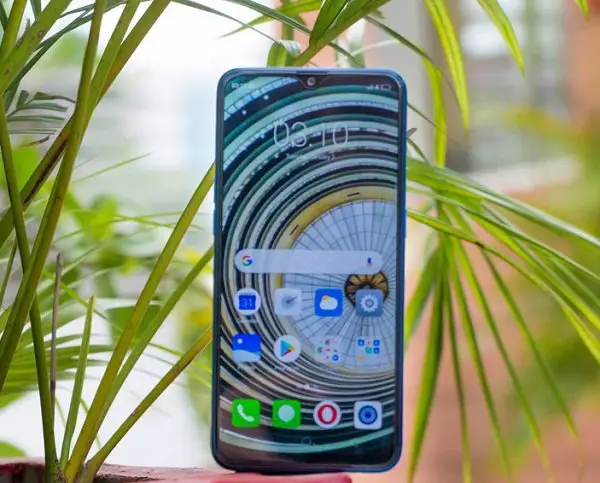
Chinese company Oppo-owned smartphone brand Realme recently launched the new addition to their second generation of smartphone series. The all-new Realme 2 Pro smartphone is now available in Indian markets through online and selected retailers. If you have already purchased this smartphone, you have to know some more things about the device. This guide talks about the Best Realme 2 Pro Tips and Tricks.
Best Realme 2 Pro Tips and Tricks
The all-new Realme 2 Pro smartphone runs on Oppo’s custom user interface ColourOS based on Android 8.1 Oreo operating system. This custom UI is a fully featured one with many hidden features and useful tricks. However, it comes with several bugs as well. Anyways, check out the best tips and tricks for the device.
Night mode
This is one of the most useful features in every smartphone. It should be available as default for every smartphone nowadays. Because of the high-frequency blue rays, the chances for your eyes get hurt is very high while using smartphones for a long time, especially at night times.
Free tools Windows power users keep installed
One-click scans. No signup required.
Night mode is available in Realme 2 Pro smartphone and it can be enabled by going to Settings → Display & Brightness → Night Shield. Just turn this feature on during night times and enjoy your digital contents without hurting your eyes.
Shopping ad

- Dual-SIM, Network Compatibility, SIM CARD 1 & 2 : [2G : GSM 850 / 900 / 1800 / 1900 and/or 3G : HSDPA 850(B5) / 900(B8) / 2100(B1) and/or 4G : FDD-LTE 700(B28) / 850(B5) / 900(B8) / 1800(B3) / 2100(B1) : TDD-LTE 2300(B40) / 2500(B41) and/or and/or 5G : N1 / N3 / N5 / N8 / N28 / N40 / N41 / N77 / N78]
- 6.7 inches, AMOLED, 1B colors, 1080 x 2412 pixels
- 256GB ROM Storage, 8GB RAM
- Android 14, Realme UI 5.0, Qualcomm SM7435-AB Snapdragon 7s Gen 2 (4 nm), Octa-core (4x2.40 GHz Cortex-A78 & 4x1.95 GHz Cortex-A55), Adreno 710
- Rear: 50MP+64MP+8MP, Front: 32MP
Assistive Ball
Realme 2 Pro smartphone has a big screen to make your experience better. However, in most cases, it becomes a headache for you to navigate while using the phone in one hand. Assistive Ball was a very popular feature debut with the iPhone devices. Realme 2 Pro also comes with this feature and it lets you navigate from any corner of the screen with the draggable ball.
You can turn it on by going to settings → Smart & Convenient → Assistive Ball and tap the slider button. You can turn it off using the same slider button.
Shopping ad

- WIFI Version, NO SIM CARD. GLOBAL VERSION GLOBAL ROM FCC ID: 2AFZZRPBFL Support Micro SD Card Up to 2TB. Redmi Pad 2 Pro screen size is about 12.1 inches when measured diagonally. Viewable area is smaller due to the curved corners. Measurements between individual products may vary.
- Size: 12.1" 2.5K crystal-clear display16:10 aspect ratioResolution: 2560 x 1600, 249 ppiRefresh rate: Up to 120HzTouch sampling rate: Up to 360Hz 240Hz (with pen)Brightness: 500 nits (typ);600 nits (HBM)TÜV Rheinland Low Blue Light (Hardware Solution) Certified TÜV Rheinland Flicker Free Certified TÜV Rheinland Circadian Friendly Certified1.07 billion colors | Dolby Vision | Reading mode | Wet touch technology
- Rear camera:8MP 1/4", f/2, 1.12μm1080P video at 30fps 720P video at 30fpsPhoto | Video | Document | Teleprompter | HDR Front camera:8MP 1/4", f/2.28, 1.12μm1080P video at 30fps 720P video at 30fps
- Snapdragon 7s Gen 4 Mobile Platform4nm manufacturing processCPU:1xA720@ 2.7 GHz+3xA720@ 2.4GHz+4xA520@ 1.8GHzGPU:Adreno 810 @1150MHz / Accelerometer | Gyroscope | Ambient light sensor | Color temperature sensor | Electronic compass | Hall sensor
- Wi-Fi 6*Wi-Fi 6 capability may vary based on regional availability and local network support.*Wi-Fi connectivity (including Wi-Fi frequency bands, Wi-Fi standards and other features as ratified in IEEE Standard 802.11 specifications) may vary based on regional availability and local network support. The function may be added via OTA when and where applicable.SBC, AAC, LDACBluetooth 5.4IPv6
Navigation Gestures
You are all familiar with the navigation gestures. It was first available with iPhone devices and now it is available on many Android smartphones including Vivo Nex. However, Realme 2 Pro also uses its advantages to make sure you get most out of your screen space.

You can turn on the navigation gestures by going to Settings → Smart & Convenient → Navigation Keys. It can be irritating for some users too. If you need to turn it off, you can use the same setting options.
Shopping ad

- realme Buds air Pro (Global Version)
- 11mm +6mm Dual-dac Driver
- 53dB Real-Time Noise Cancellation (ANC) |6-Mic with Call Noise Cancellation
- 360° Spatial Sound |Hi-Res Certified with LHDC 5.0
- Fast Charging Support : 10 min charge for up to 11hrs of Playback | Up to 48 hrs of playback
Screen Off Gestures
Screen off gesture was a very useful feature in the earlier times. It was already available in many smartphone models and it is available in Realme 2 Pro as well. It lets you control your phone even when it is in locked state or screen off state. You just need to draw the letters on the screen.

- Double tap to turn the screen on
- Draw O to start the camera
- Draw V to open torchlight
- Music Control: Draw || to pause/play a track, draw < or > to switch the track
The above are the common screen gestures available for Realme 2 Pro smartphone. To enable them, go to Settings → Smart & Convenient → Gesture & Motion → Screen-off Gestures.
Shopping ad

- Wonderful Design - Compatible for your Realme GT 2 Pro
- The combination of flexible TPU and shock absorbing Four Corners helps protect your Realme GT 2 Pro from drops and other impacts
- Its design with micro dots on the inside prevents the wet and sticky appearance, so common among transparent cases, thus helping to maintain the beautiful design of your Realme GT 2 Pro
- Made of TPU material High quality flexible thin lightweight silicone for an exact fit of the grip
- The raised bezel raises the screen and camera and provides additional protection against surfaces.
Smart call
As you know, the smart call is a very useful feature and it lets you minimize your efforts while answering the call. It lets you control the device by letting you answer calls automatically when brought near the ear, switching modes during calls and flip to mute the incoming calls.
Do these 3 things before closing this tab:
1Scan for outdated or missing drivers - takes under a minute2Clear out junk files and repair common Windows errors3Fix the driver behind crashes, sound loss and screen glitches
You can enable this by going to Settings → Smart & Convenient → Gesture & Motion →Smart Call.
These are the top features available for the Realme 2 Pro smartphone. What’s your favorite one on this list?
Quick Recap
Product prices and availability are accurate as of the date/time indicated and are subject to change. Any price and availability information displayed on Amazon at the time of purchase will apply.
Independent reader supportYour contribution helps us test, update, and keep practical guides available for everyone.
